

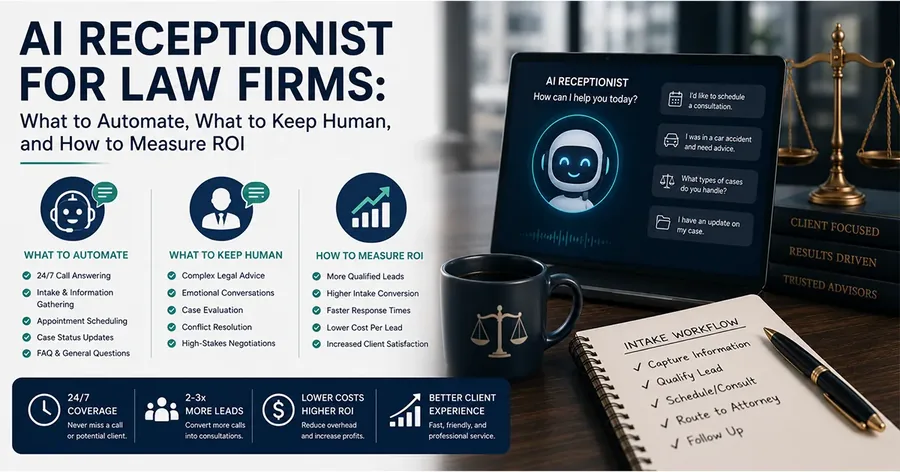
Law firm intake automation is useful only when the firm is clear about what should be automated and what should stay human.
That distinction matters. A legal prospect may be calling after an accident, an arrest, a family emergency, a denied claim, or a problem they do not know how to describe yet. The firm needs speed, consistency, and coverage. But it also needs judgment, confidentiality, conflict awareness, and careful communication.
The right intake automation system does not try to turn every conversation into a bot-led sales script. It answers quickly, collects the right facts, routes the matter, books the next step, and gives the legal team a clean handoff. Then a person makes the decisions that require legal judgment.
That is the difference between automation that protects demand and automation that creates risk.
VerdictIQ already covers the broader intake operating system in the law firm intake process guide, the execution standards in law firm intake best practices, and the buyer criteria in law firm intake software. This article is narrower: where AI helps, where it breaks, and how to design the human checkpoints that keep automation useful.
What Is Law Firm Intake Automation?
Law firm intake automation is the use of software, workflows, and AI systems to handle repeatable parts of the new-client intake process.
In a strong setup, automation can answer inbound calls, identify whether the caller is a new lead or existing client, ask practice-area-specific questions, collect contact details, capture source data, book consultations, send confirmations, create summaries, and route records into the firm's CRM or case management system.
The purpose is not to remove humans from intake. The purpose is to remove delay, inconsistency, and manual rework from the parts of intake that can be safely standardized.
A good intake automation system should make the firm faster, not reckless. It should make attorneys better prepared, not less involved. It should create cleaner records, not hide uncertainty behind polished summaries.
Why Law Firms Are Automating Intake Now
Most firms do not look for intake automation because they want a shiny new tool.
They look because the current system leaks opportunities. Calls are missed after hours. Staff are busy with existing clients. Web forms sit too long. Attorneys receive incomplete notes. Qualified prospects are told someone will call back, then they call another firm. Marketing reports show lead volume, but nobody can explain which leads were qualified, booked, showed, or signed.
Automation becomes attractive because these failures are repetitive. The same questions get asked on every call. The same booking steps happen every day. The same source fields need to be captured. The same reminders need to be sent. The same summaries need to be prepared for attorney review.
When the work is repeatable, it can often be systematized. But systematized does not mean unsupervised.
The firms that get value from automation usually start with a clear bottleneck: after-hours calls, overflow volume, inconsistent qualification, slow booking, weak follow-up, or disconnected reporting. They do not automate the whole firm on day one. They automate the parts where the rules are clear and the upside is measurable.
Where AI Helps in Law Firm Intake
AI helps most when the task requires speed, consistency, structured questioning, or summarization.
Those are real intake problems. A caller does not care that the receptionist is at lunch, the attorney is in court, or the office is closed. If the firm cannot answer and move the prospect to a clear next step, demand slips away. AI can create coverage in those moments without forcing the firm to staff every hour manually.
AI also helps with consistency. Human intake teams can be excellent, but busy days create shortcuts. One person asks the full qualification flow. Another skips source tracking. Another forgets to ask whether the caller is already represented. Automation can make the required fields and question order more reliable.
The best use cases are practical:
- Answering new-lead calls when staff are unavailable
- Separating new prospects from existing clients or vendors
- Collecting contact details and matter type
- Asking practice-area-specific qualification questions
- Capturing opposing party names for conflict review
- Booking consultations when the lead meets approved criteria
- Sending confirmation and reminder messages
- Creating structured summaries from calls or forms
- Recording source data for marketing attribution
- Routing urgent or unclear matters to a human reviewer
That list is intentionally operational. AI intake should make the first-contact workflow faster and cleaner. It should not pretend to be an attorney.
Where AI Breaks in Legal Intake
AI breaks when the firm asks it to make decisions it should not make.
Legal intake contains gray areas. A caller may describe facts that sound promising but have hidden weaknesses. A deadline may depend on jurisdiction, defendant type, discovery, tolling, or a procedural rule. A conflict may not be obvious from the first name provided. A caller may ask whether they have a case, what it is worth, what they should do next, or whether they should accept an offer.
Those are not intake automation tasks. They are attorney-review tasks.
AI also breaks when it does not know when to stop. A system that keeps improvising can over-answer, provide advice-like language, miss an escalation cue, or create a confident summary from unclear facts. In legal intake, confidence is not the same thing as correctness.
This is why guardrails matter. The American Bar Association's Formal Opinion 512 addresses lawyers' duties when using generative AI, including competence, confidentiality, communication, supervision, and fees. Intake tools are a different use case than legal drafting, but firms still need to understand what the system can and cannot do.
The safer design is simple: AI collects and organizes information. Humans decide.
The Human Checkpoints That Should Stay in the Process
The best automation plans define human checkpoints before launch.
A human checkpoint is any moment where the system stops treating the workflow as routine and requires review, approval, or escalation. These checkpoints protect the caller, the firm, and the quality of the intake record.
At minimum, law firms should keep human review around:
- Conflict checks and related-party review
- Case acceptance or rejection
- Legal advice or legal strategy questions
- Deadline interpretation
- Settlement, demand, or value discussions
- Urgent safety, custody, criminal, or medical escalation issues
- Unclear facts that do not fit the approved script
- Complaints, angry callers, or sensitive client-service issues
- Any matter that falls outside approved practice-area rules
The point is not to make the process slower. The point is to decide where speed is appropriate and where review is required.
If the system books a consultation after collecting approved qualification details, that can be efficient. If the system tells the caller whether the firm will take the case, that is a different risk category. If the system gathers incident facts, that can be useful. If it interprets a statute of limitations, the firm has likely crossed the line from intake into legal judgment.
Confidentiality Has to Be Designed In
Intake automation touches sensitive information from the first interaction.
A prospect may share medical facts, family details, criminal allegations, financial issues, immigration status, employment disputes, or names of opposing parties. Even before a matter is accepted, the firm should treat intake data with care.
ABA Model Rule 1.6 addresses confidentiality of information, and law firms should evaluate any intake automation system through that lens. State rules, firm policy, and the specifics of the technology matter, but the practical questions are straightforward.
- What data is collected during the call or form session?
- Where are transcripts, recordings, and summaries stored?
- Who can access them?
- Are permissions role-based?
- How long is data retained?
- Can the firm delete or export records?
- Which vendors or integrations receive the information?
- Is the data used to train any model outside the firm's control?
If those answers are vague, the automation is not ready for legal intake. A firm should not connect real prospect data to a system it cannot explain.
Communication Boundaries Matter Too
Automation also needs communication rules.
A caller should understand who or what they are interacting with, what the system can do, and what happens next. If an AI assistant handles the call, the firm should decide how it identifies itself, how it explains its role, and when it transfers or escalates.
ABA Model Rule 1.4 addresses lawyer-client communication duties. Intake automation does not replace the attorney's communication obligations, but it can affect the first impression, the accuracy of the record, and the clarity of the next step.
The automation should avoid language that implies representation has started unless the firm has approved that workflow. It should avoid outcome promises, case-value estimates, and advice-like statements. It should collect facts, explain that the firm will review the information, and move the caller into the approved next step.
The Intake Automation Map
A useful automation plan maps the workflow from first contact to signed client.
That map should show which steps are automated, which steps are human, and which systems receive data. Without the map, firms often buy tools in pieces: phone answering here, forms there, calendar booking somewhere else, CRM updates by hand, and reporting later if anyone remembers.
A better map looks like this:
- Lead arrives from search, ads, referral, AI answer, phone, form, or chat
- System captures source, landing page, campaign, or referral context
- Automation identifies new lead, existing client, vendor, or other route
- Practice-area flow collects approved qualification details
- Conflict information is captured for review
- Qualified leads are booked into available consultation slots
- Unclear or urgent leads are escalated to a human
- Summary, transcript, and source details are sent to the team
- CRM status tracks consultation, show, signed, rejected, or follow-up
- Reporting connects the lead source to intake outcome and signed case status
This is where automation becomes revenue infrastructure. It does not just answer calls. It preserves the path from demand to decision.
What to Automate First
Start where the rules are clear and the leakage is measurable.
For many law firms, that means after-hours calls and overflow calls. These are easy to diagnose: the phone rang, the firm did not answer, and the prospect may have gone elsewhere. A controlled AI intake layer can answer, identify the call type, collect basics, and book or route the matter according to the firm's rules.
The second good starting point is consultation booking. If the firm already knows which leads should be booked, automation can reduce callback delays and no-show risk by confirming the appointment immediately.
The third is structured summaries. Even if humans handle the calls, AI can help organize transcripts into attorney-ready notes as long as the firm reviews the output and does not treat every summary as perfect.
The fourth is source tracking. Every intake record should preserve where the lead came from. If the firm cannot connect a booked consultation to organic search, Google Ads, AI visibility, a referral, or another source, growth decisions become guesswork.
For personal injury firms, this is the same logic behind GateKeeperAI: answer quickly, qualify consistently, gather the facts attorneys need, book the consultation, and keep the intake record connected to the source that created the opportunity.
What Not to Automate First
Do not start by automating the most sensitive decisions.
Case acceptance, legal advice, deadline interpretation, fee explanations that require nuance, conflict decisions, and strategy recommendations should not be the first automation layer. These areas require firm-specific judgment and often attorney involvement.
Do not start with a generic chatbot that knows nothing about the firm's practice areas, locations, disqualifiers, booking process, or escalation rules. Generic automation creates generic answers. Legal intake needs firm-approved flows.
Do not start with AI if the firm's basic intake process is undefined. If nobody knows which fields are required, which leads qualify, who reviews urgent matters, or where records should go, AI will not solve that. It will simply accelerate the confusion.
How to Measure Intake Automation ROI
The ROI of intake automation should not be measured by how many conversations the AI handled.
That is activity, not outcome. A firm should measure whether automation improved the path from first contact to signed client.
Track these metrics before and after launch:
- Answer rate by time of day
- Missed calls and voicemail rate
- Completed intake rate
- Qualified lead rate
- Consultation booking rate
- Consultation show rate
- Signed-client rate
- Average response time
- Source-to-consultation conversion rate
- Cost per qualified consultation when ads are involved
- Cost per signed client when source data is available
The cleanest measurement setup connects call tracking, forms, CRM statuses, calendar bookings, and analytics events. Google's GA4 recommended events documentation includes the generate_lead event for lead actions, but law firms should go further by connecting that event to intake quality and signed-client outcomes.
That measurement layer is the reason VerdictIQ treats intake as part of revenue infrastructure. Automation is not finished when the AI answers. It is finished when the firm can see whether the answered lead became a qualified consultation and whether that consultation became business.
A Safe Rollout Plan for Law Firm Intake Automation
A safe rollout starts small, tests real scenarios, and expands only after review.
The first step is to document the current intake workflow. List the channels, scripts, required fields, disqualifiers, booking rules, conflict process, escalation rules, systems, and reporting gaps. If the current workflow is undocumented, automation should begin with documentation.
The second step is to choose one use case. After-hours personal injury calls are a common starting point because the problem is clear and the value is easy to understand. Another firm might start with website form follow-up or consultation booking. The use case should have clear boundaries.
The third step is to write the approved intake flow. This should include what the system may ask, what it may say, what it must not say, when it books, when it escalates, and how the summary should be structured.
The fourth step is internal testing. Run sample calls and forms that include qualified leads, unqualified leads, angry callers, unclear facts, existing clients, vendors, wrong practice areas, urgent matters, and edge cases. Review transcripts and summaries before going live.
The fifth step is monitored launch. For the first week, review every record. Do not wait a month to discover that a question is confusing, a summary field is missing, or an escalation rule is too loose.
The sixth step is expansion. Once the first workflow is stable, the firm can add additional practice areas, hours, channels, integrations, or reporting layers.
Common Intake Automation Mistakes
The first mistake is automating without a script. If the firm does not define what should happen, the system cannot reliably follow the firm's process.
The second mistake is treating all leads the same. A personal injury lead, criminal defense lead, estate planning lead, and family law lead need different questions and routing rules.
The third mistake is using automation without source tracking. The firm may capture more leads but still have no idea which marketing channels deserve more investment.
The fourth mistake is failing to review summaries. AI-generated summaries can be useful, but they should be treated as operational drafts that require quality review, especially during rollout.
The fifth mistake is letting the AI sound like it is giving legal advice. The system should stay in the lane of fact collection, routing, scheduling, and handoff.
The sixth mistake is launching with no fallback. Every automation needs a human handoff path, a failure mode, and an owner responsible for reviewing performance.
How This Supports SEO and AI Visibility
Intake automation is not separate from SEO.
When a firm invests in personal injury lawyer SEO, local rankings, Google Ads, referrals, or AI visibility for law firms, intake is the conversion layer that protects that demand.
A page can rank. An AI answer can cite the firm. A prospect can click, call, or submit a form. But if the firm does not answer quickly, qualify clearly, and book the next step, visibility does not become revenue.
This is especially important as prospects discover firms across more surfaces. A visitor may come from Google organic search, a Google Business Profile, a legal directory, a paid landing page, a ChatGPT answer, a Perplexity citation, or a referral text. The intake system should preserve that source context so the firm can understand what is working.
For the AI discovery side, read the AI search visibility for law firms guide and the law firm ChatGPT visibility article. Those pieces explain how prospects find the firm. Intake automation explains what happens after they reach out.
Where VerdictIQ Fits
VerdictIQ builds law firm growth systems that connect visibility, conversion, intake, and measurement.
For intake automation, that means designing the workflow before pushing AI into it. The firm needs approved qualification rules, safe language, escalation points, booking logic, source tracking, summaries, and reporting. The tool matters, but the operating model matters more.
GateKeeperAI is the VerdictIQ intake layer for firms that need calls answered, leads qualified, facts gathered, consultations booked, and records handed off cleanly. It is built around the idea that AI should protect the intake path while attorneys keep the judgment work.
If your firm is still deciding what to automate first, the broader AI consulting for law firms guide explains how to prioritize intake, visibility, workflow, and reporting projects without turning AI into a disconnected experiment.
Final Thought
Law firm intake automation works when it is honest about the boundary between speed and judgment.
AI can answer faster than staff, ask consistent questions, book consultations, summarize calls, and preserve source data. That is valuable. But the system should not decide legal strategy, interpret deadlines, accept cases, or replace attorney review.
The best automation does not make the firm less human. It makes the firm more responsive, more organized, and more measurable at the exact moment a prospect is asking for help.
If your firm wants intake automation that protects qualified leads without blurring the line between AI support and legal judgment, book a VerdictIQ strategy call and we will map the safest first workflow.